
There’s a pattern we keep seeing across the B2B product teams we work with. A founder or a CTO reads about AI agents. They get excited — reasonably so. They come to us and say: “We want to add an AI agent to our platform.” And then the conversation stalls, because nobody on the team has actually run one. Not set one up. Not watched it fail. Not seen a $40 bill land after 48 hours of what was essentially light testing.
At Camplight, we believe you shouldn’t commit budget to building something your team hasn’t pressure-tested. That’s the validation-first principle we apply to every product and venture we help build — and it applies just as much to AI features as to anything else.
So we ran the experiments ourselves. We stood up AI agents, broke them in interesting ways, and paid real money to learn real lessons. This article is the debrief, structured specifically for product and technical leaders evaluating whether agentic AI belongs in their next build cycle.
What “AI Agent” Actually Means at the Architecture Level
Before you can make a sound product decision, you need a working mental model of what you’re actually dealing with.
An AI agent is not a chatbot with more features. The distinction matters. A chatbot responds when prompted and forgets everything when the session ends. An agent operates differently across three dimensions: it maintains persistent memory between sessions, it can take actions on external systems through what’s called “tool calling”, and it runs autonomously on a schedule — not just when a user types something.
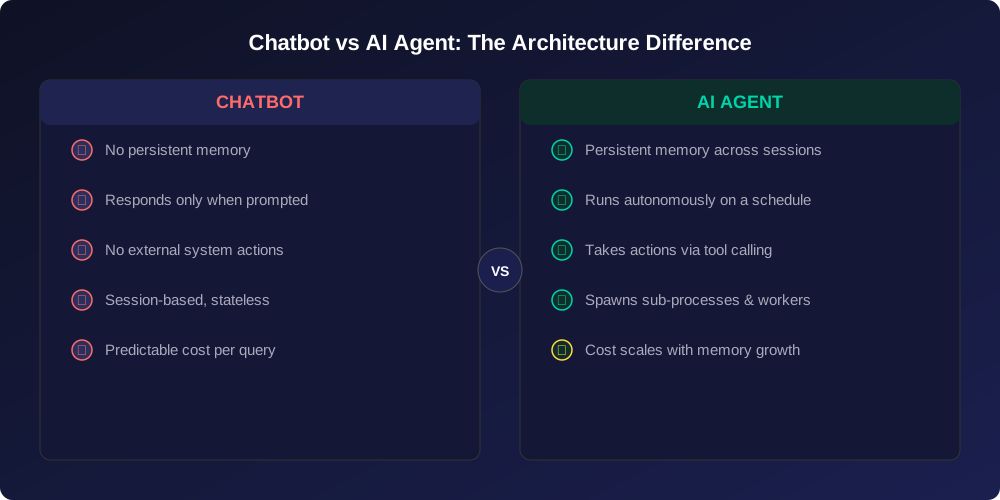
That last point is the one most teams underestimate. The agent frameworks available today run on a heartbeat cycle — a scheduled trigger that fires every 30 minutes, waking the agent to check its task list, call the underlying language model, act on whatever it finds, and update its own memory before going back to sleep. On top of that, the agent can spawn its own scheduled sub-processes and persistent background workers.
The implication for product design is significant: you are not building a feature that responds to users. You are building a system that acts independently, on a schedule, against live data. The validation criteria, the testing surface, and the failure modes are completely different from anything a standard web feature introduces.
The Three Questions Your Team Needs to Answer Before Building
We’ve distilled our experimentation into three diagnostic questions. If your team can’t answer all three with specificity, you’re not ready to build — and that’s fine. It means you need a validation sprint first.

1. What Does the Agent Actually Need to Do — and Can Current Models Do It Reliably?
This sounds obvious. It isn’t. The most common mistake product teams make is scoping features based on what agents are theoretically capable of, rather than what the specific model tier they can afford will reliably deliver.
Here’s a concrete example from our testing: we ran a cheaper open-source model (LLaMA 3 70B) as the reasoning engine for an agent tasked with monitoring social media content. When asked whether it had access to social media feeds, it said yes. It described posts it had supposedly found. None of it was real — the model fabricated the entire response because it was optimising for sounding helpful rather than being accurate.
This is what the field calls hallucination, and according to research from Stanford and MIT, hallucination rates vary dramatically by model tier — from under 3% on frontier models to over 27% on smaller open-source alternatives. The practical lesson: the model you can afford determines the feature you can ship. Promising your users that an AI agent will monitor their inbox, flag anomalies, or summarise competitive intelligence is only credible if you’ve verified that your chosen model handles those tasks with acceptable accuracy under real conditions.
2. Have You Modelled the Cost Curve at Scale?
AI agents have a cost structure that behaves unlike almost anything else in a modern software stack — and most product teams aren’t prepared for it.
Every interaction between an agent and its underlying language model is billed by the volume of text processed — both what goes in and what comes back out. Now factor in that an agent with persistent memory sends that memory as context with every single request. As the agent operates over days and weeks, its memory grows. Which means each heartbeat cycle becomes progressively more expensive, even if the tasks themselves haven’t changed.

We tested this directly. An agent running on Claude Opus cost nearly $40 over two days of light, exploratory usage. Extrapolated to a month, that’s over $500 in LLM costs alone — before you’ve added hosting, tooling, or any kind of maintenance overhead. According to a16z’s analysis of enterprise AI spending, LLM inference costs now represent the largest single line item in AI feature budgets, often exceeding engineering labour costs.
Before you put an agent in front of users, your team needs a cost model that accounts for the expected number of heartbeat cycles per day, the projected growth of the agent’s memory over time, the cost per token of your chosen model, and what happens to all of those figures if usage doubles. This is the same unit economics discipline we apply to every product feature we help validate.
3. What Happens When the Agent Does Two Things at Once?
This is the architectural question that most teams encounter only after they’ve started building — and by then it’s expensive to fix.
Current agent frameworks allow multiple scheduling mechanisms to coexist: the base heartbeat, additional time-based triggers that the agent configures for itself, and persistent background processes for long-running tasks. Under normal conditions, this works. Under load — or simply when timing aligns badly — multiple processes can fire simultaneously, all reading from the same shared memory and all attempting to execute related tasks.
The result is task duplication at best, and corrupted state at worst. We saw this happen in our own test environment: an agent instance created genuine chaos in its own file system because two concurrent processes tried to write to the same memory simultaneously with no conflict resolution. For a consumer-facing product, that category of failure isn’t recoverable with an apology email. It’s a trust event.
If you’re planning to put agents anywhere near user data or user-facing workflows, you need architectural guardrails — concurrency controls, idempotency checks, clear separation between read and write operations — before you go live, not after. This aligns with our engineering principles for reliable AI-assisted development.
What AI Agents Are Actually Good For Right Now
None of the above is an argument against building with agents. It’s an argument for building with your eyes open. And there are genuine use cases where the technology delivers real, compounding value today.
In our experience across 300+ product builds, agents add the most durable value when three conditions are met: the task recurs frequently enough to justify the overhead, it spans multiple data sources that would otherwise require manual coordination, and the output can be verified by the user before it triggers any consequential action.
A morning briefing that pulls from a calendar, a finance feed, and a project management tool — and then sends a summary to a Slack channel for a human to review — fits those criteria. An agent that autonomously executes trades or sends client-facing emails without review does not, at least not with today’s reliability levels.
The teams we’ve seen get the most value from agents early are those who frame the agent as an intelligent assistant that prepares information and drafts actions for human approval, rather than one that acts autonomously in high-stakes domains. That framing is also easier to validate, easier to explain to end users, and significantly safer to operate while the underlying technology continues to mature. For a deeper dive into how AI accelerates decision-making when paired with human oversight, see our earlier analysis.
The Camplight Approach: Validate Before You Architect
When a client comes to us wanting to build an AI agent feature, we start with three validation questions rather than with infrastructure decisions:
Who specifically benefits, and what does success look like for them? Not “the user will save time” — something measurable. The agent surfaces three relevant leads per day that the sales team wouldn’t have found manually. The agent reduces the time to generate a weekly report from two hours to ten minutes. Concrete, falsifiable outcomes.
What’s the minimum viable version we can test with real users in two weeks? Often this means simulating the agent’s output manually before building any automation — confirming that the information it would surface is actually valuable, before spending a dollar on LLM API costs. This is the same approach we advocate in our guide to validating ideas before hiring developers.
What’s our failure budget? Meaning: how wrong can the agent be, how often, before it erodes user trust? A research summarisation tool can tolerate occasional inaccuracies if users know to verify. A tool that sends communications on behalf of users cannot. The failure budget defines the model tier requirement, the human-in-the-loop design, and the scope of what you ship first.
This is the same validation-first discipline that has driven our 95% client satisfaction rate across 300+ delivered projects. It applies to AI features exactly as much as it applies to everything else.
A Realistic Roadmap for Your First Agent Feature
If you’ve read this far and you’re still interested — good. Here’s how we’d structure the first 90 days for a team building their first agentic feature.

Days 1–14: Define and Simulate
Write the task specification for your agent in plain language. What does it monitor? What does it do when it finds something? What does it never do without human approval? Then simulate the outputs manually — have a team member perform the task the agent would perform — and test whether users actually find the result valuable. This costs almost nothing and eliminates the most common reason agent features fail: the output wasn’t useful in the first place.
Days 15–45: Build the Thin Version
Stand up a minimal agent — single task, single data source, single output channel, manual review before any action. Use this phase to validate your cost model against real usage, identify the edge cases your task specification didn’t anticipate, and confirm that the model tier you’ve chosen produces reliable enough output for your failure budget. For teams building their first AI-assisted development workflow, this phase is where the real learning happens.
Days 46–90: Harden and Expand
Only once the thin version is producing consistent, trusted output do you invest in concurrency controls, memory management, multi-tool integrations, and additional task complexity. This is also when the cost model you built in phase two becomes the basis for your pricing or infrastructure decisions.
The Bottom Line for Product Leaders
AI agents are not a feature you can spec, scope, and hand off to a development team in the same way you’d handle a new dashboard or an integration. They’re an architectural commitment that introduces new cost structures, new failure modes, and new trust dynamics with your users.
The teams that are winning with agents right now are those who treated the first version as a learning exercise rather than a product launch. They ran cheap experiments, built honest cost models, and shipped thin versions to small user groups before scaling. They validated before they built.
If you’re at the stage of evaluating whether agents belong in your roadmap, or you’re already building and hitting the walls we’ve described, we’d be glad to think it through with you. This is exactly the kind of problem our engineering cooperative exists to help with.
Ready to explore AI agents for your product?
Our engineering cooperative has helped 300+ teams validate, build, and scale digital products. We’ll help you answer the three diagnostic questions, model costs, and build your first agent feature the right way — starting with validation, not architecture.
Frequently Asked Questions
What’s the difference between a chatbot and an AI agent?
A chatbot responds when prompted and has no persistent state. An AI agent maintains memory across sessions, runs on a schedule without user prompting, and can take actions on external systems — sending messages, reading data sources, updating records — through tool-calling integrations.
How much does it cost to run an AI agent?
Costs vary significantly by model tier and usage pattern. Based on our testing, a lightly used agent on a premium model can cost $40–$600 per month in LLM API fees alone. Costs scale with the size of the agent’s memory and the frequency of its scheduled cycles. A proper cost model should be built during validation, before committing to architecture.
Are AI agents production-ready in 2026?
For specific, well-scoped use cases with human review in the loop — yes. For fully autonomous operation in high-stakes domains — not yet. The core frameworks are still maturing, particularly around concurrency and state management. We recommend a validation-first approach before any significant infrastructure investment.
What industries benefit most from AI agent features?
We’ve seen the strongest validated use cases in FinTech (monitoring, reporting, alerting), HealthTech (data aggregation and triage support), and EdTech (personalised content surfacing and progress tracking). The common thread is repetitive, multi-source tasks where the output is reviewed by a human before any consequential action is taken. Learn more about how Camplight approaches AI integration across industries.
Camplight is a worker-owned software cooperative founded in 2012. We help B2B teams validate, build, and scale digital products and ventures — from zero to $10M+ ARR. Our validation-first approach has driven a 95% client satisfaction rate across 300+ delivered projects in FinTech, HealthTech, EdTech, and beyond.
Interested in building AI features into your product? Let’s talk!